In-house financing software helps buy here pay here (BHPH) dealerships manage the loans they carry, including customer balances, payment schedules, collections, and account records.
For a new dealership, a spreadsheet and a reliable way to accept payments may be enough to get started. As the book grows, though, keeping everything organized can require more time and attention.
Around 25 active notes is a good time to start evaluating your process. That doesn’t mean a spreadsheet suddenly stops working. It means getting ahead of potential problems before you’re managing 50, 75, or 100 accounts.
It’s also important to understand the difference between a dealer management system (DMS) and dedicated payment software. A DMS typically manages inventory, sales, financing, and customer records. Many DMS providers also offer payment processing, reminders, and collection tools.
Dedicated payment software focuses specifically on how customers pay, how payments are tracked, and how dealers manage the collection process.
Both can play an important role in running a dealership.
Why it matters on a lot
Selling a vehicle is only the beginning of an in-house financing relationship. Once the customer drives away, the dealership is responsible for managing payments over the life of the loan.
Consider a dealership carrying 40 notes with scheduled payments of $125 per week.
That’s approximately $5,000 in scheduled payments every week, assuming each note is due weekly.
Now consider what happens when those payments arrive through different channels.
Some customers pay at the dealership. Others prefer a card, bank transfer, or payment link. A few may need reminders, while others have already enrolled in AutoPay.
Each payment needs to be recorded, applied to the correct account, and reflected in the customer’s balance.
As the number of accounts grows, these routine tasks can take up a significant part of the day.
Good software helps dealerships manage five important responsibilities:
- Maintain accurate account records. Keep customer balances, payment schedules, and account histories organized.
- Communicate with customers. Send reminders about upcoming payments and follow up when accounts become past due.
- Accept payments. Give customers convenient ways to pay, whether online, automatically, or at the dealership.
- Record payment activity. Apply payments to the correct accounts, update balances, and provide receipts.
- Monitor the portfolio. Understand which accounts are current, which payments are coming due, and where collections need attention.
Many dealer management systems already offer some or all of these capabilities. Others provide them through additional payment services or integrations.
The important question isn’t whether a feature exists. It’s whether the tools work well together for your dealership.
When should a dealership consider payment software?
Four signs worth paying attention to
None of these automatically means a dealership needs to replace its existing software.
Sometimes the solution is improving a workflow, using features already available, or adding a dedicated payment platform.
Why newer dealerships should think ahead
New dealerships have an opportunity to establish good payment habits before their portfolio grows.
With eight or ten active notes, it’s easier to organize account information, establish payment methods, and introduce customers to a consistent payment process.
That foundation becomes increasingly valuable as the dealership adds more vehicles and customers.
Setting up the right tools early can help avoid unnecessary administrative work later.
What to look for in payment software
Whether you’re evaluating the payment tools included with your DMS or considering a separate provider, there are several things worth comparing.
Payment options
Customers don’t all prefer to pay the same way.
Look for software that supports the payment methods your dealership needs, such as debit cards, bank payments, AutoPay, and in-person transactions.
Also consider whether customers can make payments without calling the dealership during business hours.
Accurate payment records
A payment system should make it easy to determine when a payment was initiated, whether it has completed processing, and which customer account it belongs to.
You should also be able to review receipts, payment history, and returned transactions without searching through separate systems.
Automated reminders
Payment reminders can help dealerships maintain consistent communication without requiring employees to contact every customer individually.
Look for flexibility around reminder schedules, customer preferences, and payment links.
Portfolio visibility
A useful dashboard should help answer practical questions:
- How much has been collected today?
- Which customers have payments coming due?
- Which accounts are past due?
- What is the current outstanding balance across the portfolio?
The information should be easy to find without running several separate reports.
Settlement and reconciliation
Accepting a payment and receiving the funds are two different steps.
Dealers should understand how payment processing works, when funds become available, and how deposits correspond to individual transactions.
Clear settlement reporting makes it easier to reconcile payment activity with bank deposits.
Pricing and contracts
Before selecting a provider, understand the full cost of the service.
Review monthly platform fees, transaction processing costs, potential customer fees, setup charges, and any additional modules.
Also review contract terms, cancellation policies, and whether pricing changes as the dealership grows.
Customer experience
Consider what the payment process looks like from the borrower’s perspective.
Can customers easily find their next payment? Can they review their balance? Can they enroll in AutoPay? Are payment instructions easy to understand?
A simpler payment experience can make the process easier for both customers and dealership staff.
Where AmortPay fits
AmortPay is payment software built specifically for buy here pay here dealerships.
Rather than replacing the dealership’s DMS, AmortPay focuses on the payment side of the operation.
Dealers can continue using their existing systems for inventory, sales, contracts, and other dealership processes while using AmortPay to manage customer payments and related activity.
Here’s what that looks like.
Keep your DMS. Bring your customers.
You don’t need to leave your DMS to use AmortPay.
Import your existing customer accounts through a CSV file and start managing payments through AmortPay while continuing to use the systems you already have in place.
Understanding the cost
The cost of payment software depends on the provider, the payment methods offered, and the services included.
AmortPay’s platform fee is $99 per month, covering access to the payment platform, customer payment experiences, reminders, receipts, and dealer account management tools.
The monthly subscription doesn’t begin until your first customer successfully makes a payment through the platform.
This gives new dealerships time to establish their operations and existing dealerships an opportunity to complete setup before subscription billing begins.
Three costs to understand
The recurring subscription for using the software.
For AmortPay, this is $99 per month once the first customer payment has been collected.
The fees associated with processing card or bank payments.
These depend on the payment method and the processing arrangement established with the dealership.
Where permitted by applicable law, certain online payment methods may carry a customer fee, with a fee-free payment alternative available.
In other situations, the dealership may be responsible for processing costs.
Fee arrangements and permitted payment practices can vary by state and transaction type.
AmortPay does not charge a processing fee for cash payments recorded at the dealership.
Before choosing any payment provider, ask for a complete breakdown of these costs and how they apply to your dealership.
Simple for dealers. Simple for customers.
Good payment software should be easy to understand for everyone using it.
For the dealership, that means being able to open the dashboard and quickly identify what needs attention.
For customers, it means having a straightforward way to make a payment and understand their account.
The customer experience
A borrower shouldn’t have to call the dealership every time they want to check their next payment or review their balance.
With AmortPay, customers can access their payment information from their phones.
They can view their vehicle, outstanding balance, upcoming payment, and payment history.
Customers can also make payments, review receipts, and manage supported AutoPay options.
The experience is designed with accessibility in mind, including readable text, clear navigation, and mobile-friendly controls.
English and Spanish support helps make payment information more accessible to the customers dealerships serve.
The dealer experience
Dealers need a different view of the same information.
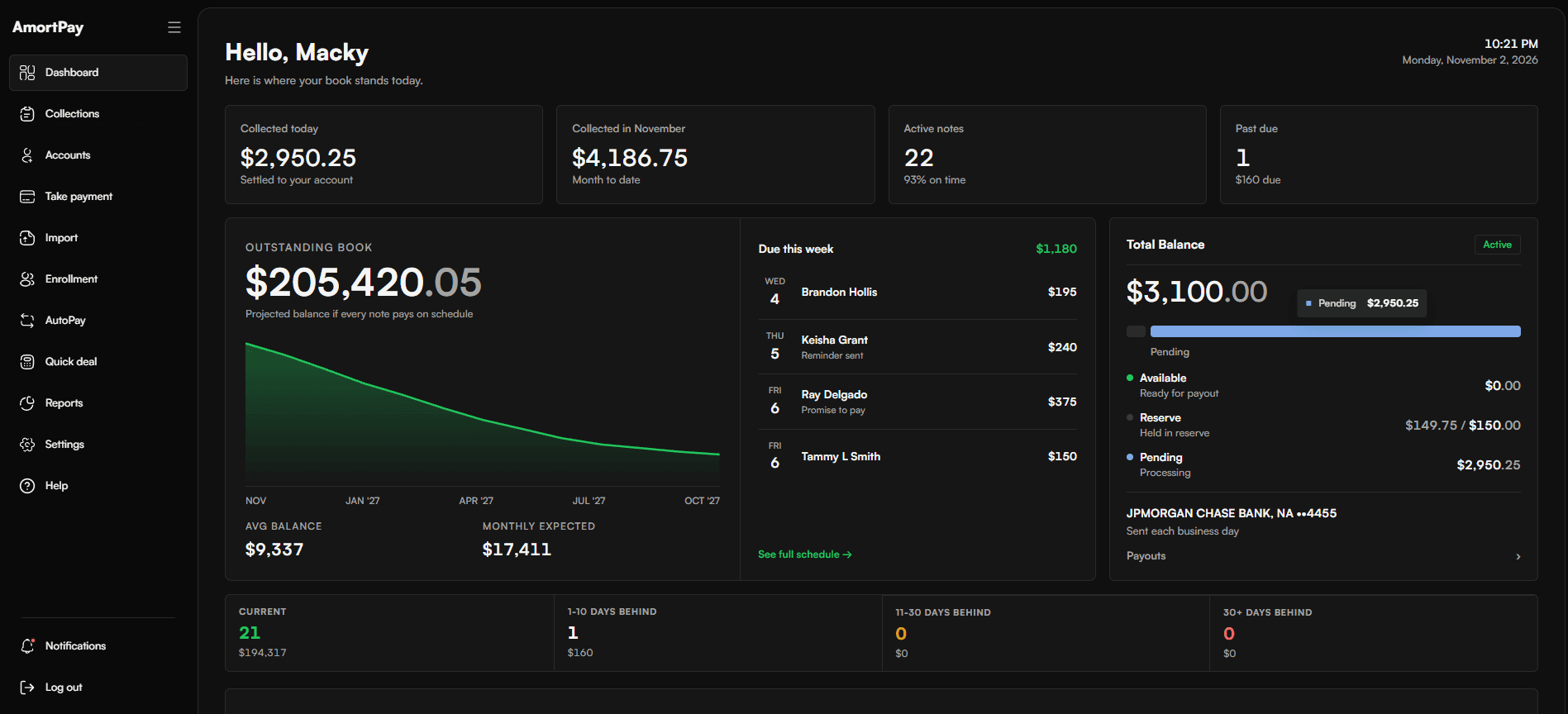
Instead of opening individual accounts to determine where the book stands, AmortPay brings key information together on the dashboard.
You can see what’s been collected, which payments are coming due, and which accounts need attention.
From there, individual customer accounts provide access to balances, payment schedules, receivables, and transaction history.
The goal is straightforward: less time searching for information and more time managing the dealership.
What to do this week
You don’t have to change your software immediately to start improving your payment process.
Begin by reviewing how things work today.
- Time your payment reconciliation. Write down how long it takes to review and record payments at the end of the week.
- List your payment methods. Identify every way customers currently pay and who is responsible for recording each transaction.
- Review your deposits. Compare recent bank deposits with the payments recorded in your accounts. Identify any transactions that take extra time to reconcile.
- Check your past-due workflow. Determine how customers are reminded, how follow-ups are tracked, and how your team knows which accounts need attention.
- Think about your next 25 accounts. Consider whether the process you use today will still be manageable as your dealership grows.
If any of these steps reveal unnecessary work, it may be time to review your existing tools or explore a dedicated payment solution.
Frequently asked questions
Yes. AmortPay is designed to work alongside your existing DMS.
You can continue using your DMS for dealership management, inventory, contracts, and other operations while managing customer payments through AmortPay.
No. Customers can make payments through a link on their phones without downloading a separate application.
They can also access their account information through the borrower portal.
Yes. Customers can authorize scheduled automatic payments and manage their AutoPay preferences through supported account features.
AutoPay is optional and requires customer authorization.
Yes. Dealers can record cash payments made at the dealership so the activity is reflected in the customer's account.
AmortPay does not charge a processing fee for recording cash payments.
Payments are associated with the appropriate customer account and reflected in the payment history.
Processing statuses distinguish payments that are still processing from those that have completed.
Receipts and transaction records help dealers review payment activity.
Returned bank payments are identified in the system so dealers can review the transaction and follow up with the customer.
Payment status and account records reflect the return according to the applicable processing workflow.
Yes. AmortPay supports importing customer account information from CSV files.
This allows dealerships to bring existing account data from supported spreadsheet exports without manually creating every account.
AmortPay's platform subscription is $99 per month.
Subscription billing begins after your first customer payment is collected through the platform.
Payment processing costs are established with the dealership, and any permitted customer fees depend on the applicable payment arrangement and state requirements.
No. AmortPay is a dedicated payment platform, not a complete dealer management system.
Some DMS providers already offer their own payment solutions, and dealers should compare those capabilities with their needs.
AmortPay is an option for dealerships that want a payment-focused experience alongside the systems they already use.
- Texas Finance Code, Chapter 348, motor vehicle installment sales. Refer to applicable provisions when evaluating financing and payment-related requirements.
- Web Content Accessibility Guidelines (WCAG) 2.1, W3C guidance for accessible digital experiences.
Last updated November 3, 2026.
Written by Uzoma O., Founder of AmortPay, Dallas, Texas.